Saturday, October 8, 2011

Make Yourself Visible through Blogging

I am in the midst of doing research for a new book. Because it is about blogging, I have been looking for very specific blogs and want to talk about the people who own them. But, guess what? Nine out of ten times when I find a blog about the topic I am researching, the owner of the blog is not available.

So, if you own a blog, you never know who may be wanting to interview you. Make sure that you have an email address available so that people can actually reach you and have a conversation or ask for more info. etc.

Who would have a blog or website that promotes a business and not make their information available to people who find them on the internet? Even if someone's name comes up at the top of Google, unless they are available to discuss their wares, it all seems pointless. Just sayin'....

Until next time,
Cindy

Organic Traffic

If you have already "taken the plunge" into blogging, I should explain the importance of backlinks--links from other people's blogs to yours. The more links to you, the more valuable your blog is as a commodity.

Did you know that people can buy backlinks? Yes, they can! But, this is frowned upon by search engines like Google. Instead, they want you to have natural or "organic" traffic--meaning that people come to you or link to you because they think you have something valuable to say.

How is your organic internet garden growing? If you want to check your blog's ranking, just go to my FREE online seminar up above and in the first class is a place where you can go to check yours.

Until next time, Happy blogging!

Cindy

Friday, October 7, 2011

Word Verification for Blogger

Word verification for Blogger helps eliminate spam or unwanted comments. However, when visitors take their time to visit your blog and make a comment, they do not appreciate having to put a code into a box.

So...what did I do? I got rid of word verification on ALL my blogs because I really want them to be "visitor-friendly." If you want to know how to get rid of yours, just go HERE for my quick tutorial that can walk you through it in minutes.

I have gone to blogs that have word verification, make a comment, see that screen pop up that demands I unscramble a word and I am "out of there!" I don't like it and it slows down the process of visiting blogs that I deem really important to me. If I want to make a comment about someone's beautiful table setting , I don't want to feel like I am at the Pentagon going through security. Just sayin'....


Cindy


Blog for Free


Some inspiration for your blog...


Many people wonder how to create a blog for fun or business. After having a website for a year, I discovered Blogger and traffic increased immeasurably. Why? Because it’s interactive and guests can leave comments and become part of the dialogue.


If you are a woman who is considering blogging and would like some inspiration, I have written 2 books--Blog from the Heart: A Woman’s Guide to Blogging and Blogging: It’s a “Woman” Thing--each available on Amazon.


If you already have a blog and have just “happened” on to this page, both of these books are non-technical and purely for inspiration to help YOU come up with great ideas to blog about on a daily or weekly basis.


At the current time, I have a main blog called Whimsical Musings. Whimsical Musings Magazine (which you are on) has many tutorials to show you how to do things on Blogger, such as add a blog button. Please bookmark this page so that if you need those tutorials later you will know how to find them. I have simple screen shots and it is difficult to find this type of handy info. ALL IN ONE PLACE, so since they're here, you may as well get the benefits of them.


If you want to know how to increase traffic to your blog, join blog parties, etc. just read my Blogging 101 Seminar at the top of the page. Click the tab and there you'll be! Easy, peasy! What is one of the biggest complaints from bloggers? "I don't know how to get traffic!" Well, the seminar will definitely help you with that.


Blogging is fun. I hope you enjoy the journey!


Cindy

Search Engine Optimization How to

What is search engine optimization--(SEO)? Search engine optimization simply means the ability to have your blog or website come up higher in search engines. It means that if you take a few steps in the right direction, you will have a better chance of having your domains be found by people on the web--in short, more traffic! But, first it’s a good idea to find out what your ranking already is. That is all covered in my easy online seminar and that part is in the very FIRST section.

My Free “Blogging 101” Seminar is listed on the tab above. I hope you enjoy the classes and when you’re finished, you are welcome to take my Graduation Certificate and place it on your blog or website with a link back to here.


I hope that the seminar is super-helpful!!!!


Cindy

Thursday, October 6, 2011

AWESOME Software for Digital Art


As many of you know, I am a graphic designer...I create blog buttons and headers for blogs. I just discovered a new software program that makes designing and digital scrapbooking SO easy! I got it yesterday and made so many fun things.

The awesome thing is that you can put your own pictures in and put them on their amazing backgrounds. There's SO many backgrounds that come with the program--can you believe it? Anyway, there are flowers, sewing stitches, fleurishes, and more included--all the cutest stuff for making scrap book pages and after they're done, you can even print them out---How great would something like that be framed as a Christmas gift?

If you would like to purchase one (and they are not expensive) just use MY promo code to save $10 on My Memories Suite V2. My code is: STMMMS19107 Just enter the number at check-out for your discount!! Make sure you enter it correctly to get the discount.

To purchase, go Here.

XO
Cindy

Steve Jobs Is Gone: A Tribute

Steve Jobs has passed away--a visionary and a man whose genius will be felt for many years to come. How could such a legend be so humble? It was a rare combination and one we can all learn from, indeed. His spirit just seems to be with so many us that he didn't even know. I believe his impact on our world will be felt forever--what a gentle spirit gone far too soon. Rest in peace, Steve.


Tuesday, October 4, 2011

Change Column Widths on Blogger


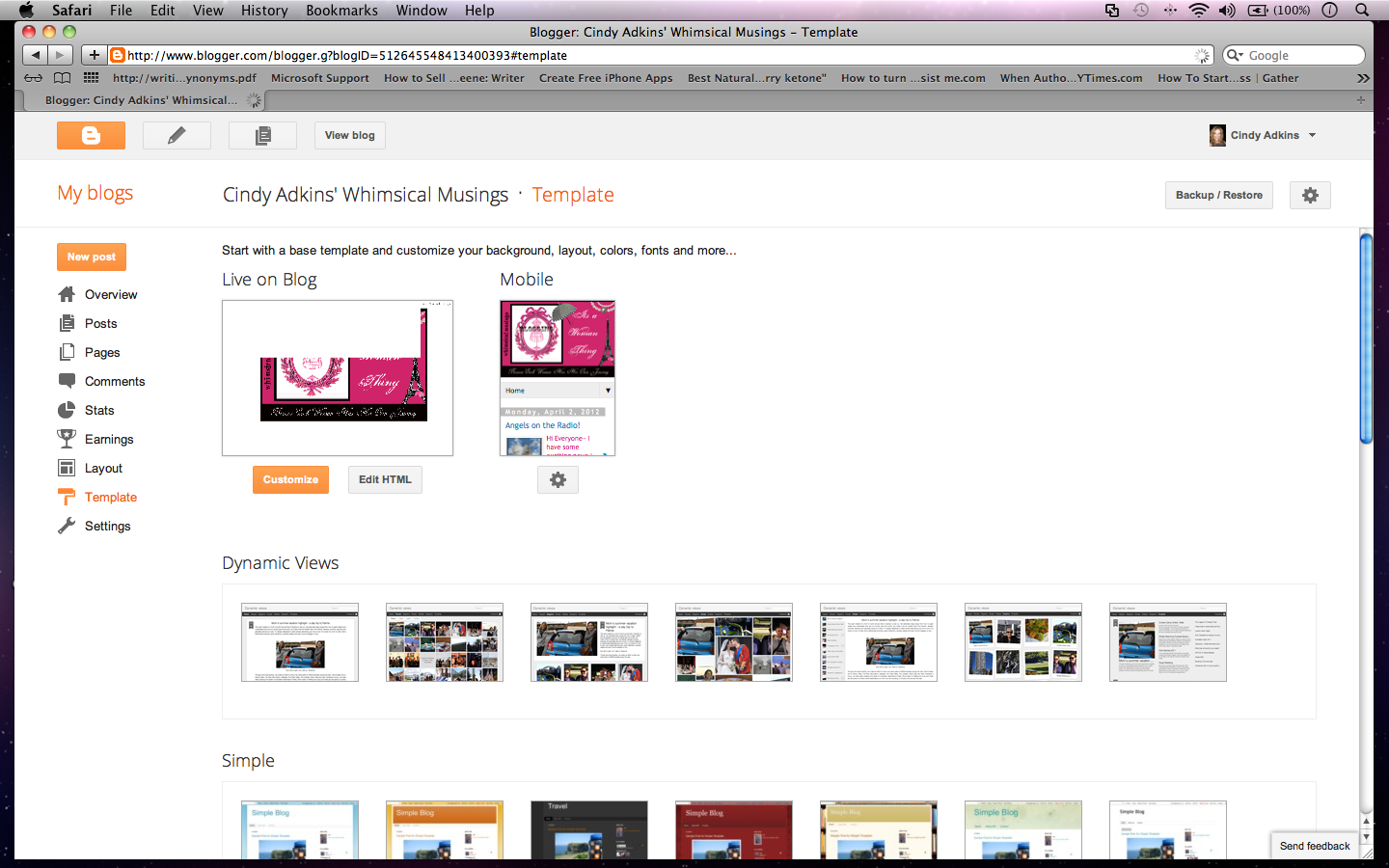
Changing the width of your columns on Blogger is easy-peasy!! First, go to your blog and scroll up to the top where it says DESIGN. Click it.


You will now be taken to your design template. Look familiar?  When you are there, CLICK the orange button that says CUSTOMIZE--it is rectangular and near the top of the page.


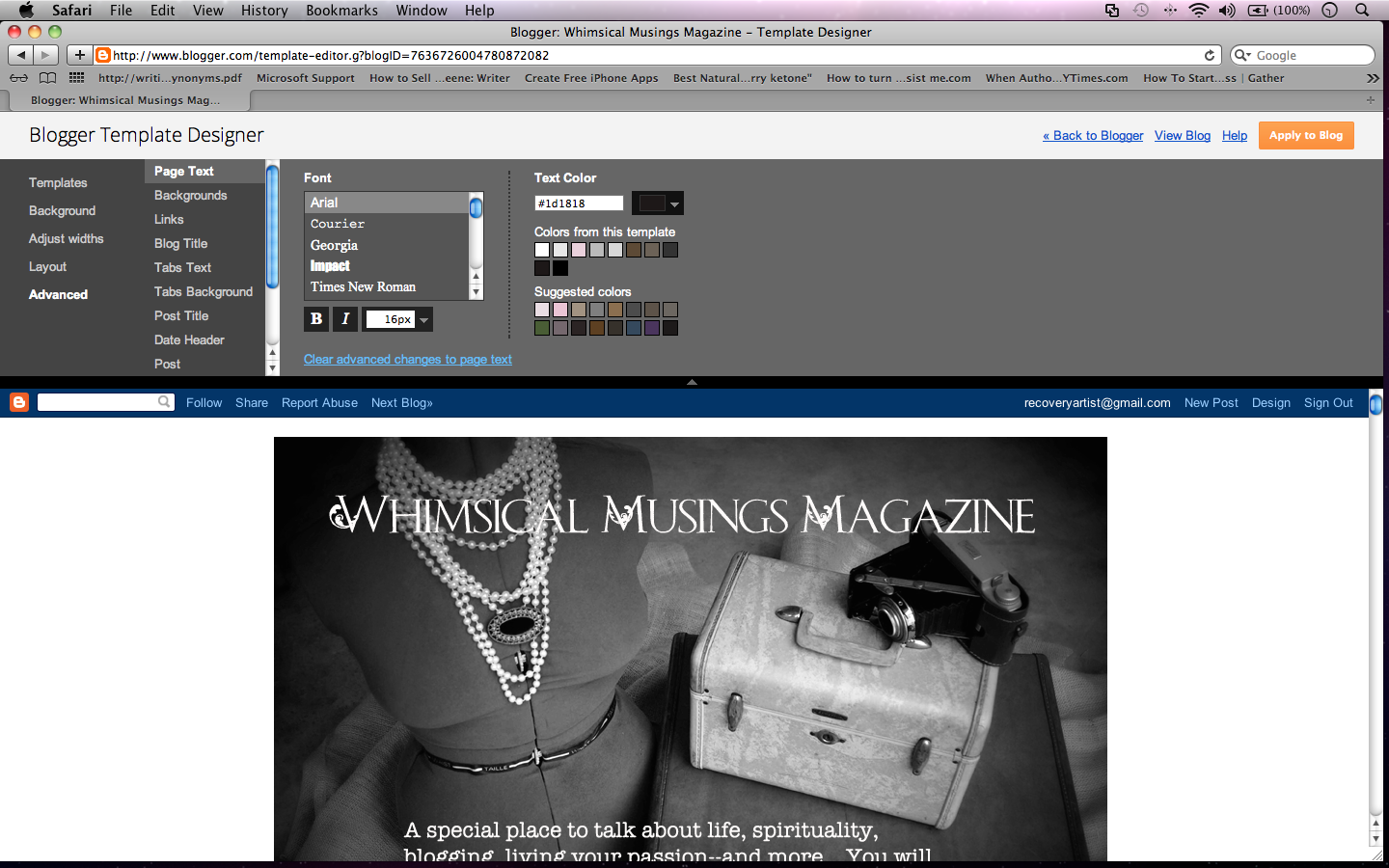
This will take you to BLOGGER TEMPLATE DESIGNER.  On the left sidebar, click ADJUST WIDTHS.

Next, a screen will appear to adjust widths.  As you move them slowly back and forth you can see what your blog will look like.  Once you have it how you want it to appear, click APPLY TO BLOG.  All done!


If you need more tutorials, just scroll down. Also, if you need a blog button, I make them...They're not expensive. Just email me at: Cindylou_20@hotmail.com

If this was helpful, please click the +1 button below--thanks a million!


Make a Video


If you want to make a video, it is the best way to bring traffic to your blog!!!

So, what do you do?

Go to Animoto. Insert you own pictures and text. Choose a song that you like--ALL DONE!!!

All I ask is, please click HERE on Youtube! and ALL of my videos are on that page....2 weeks ago, I made 16 of them. If you want to see one of them to see how I made them with simple pictures, it will give you an example of how to make them easily.

Just make sure that if you make the free video on Animoto, it is not for commercial purposes, so don't mention any shop on your video. You can let people know your blog address though!

I hope this was helpful!!!

XO
Cindy

How Do I Blog?


If you are new to the world of blogging, trust me, it's FUN!!! To increase traffic to your blog, you will need a blog button--I make them! If you need one, just contact me at: Cindylou_20@hotmail.com They're inexpensive!

If you have a blog already, just tell me the address so I can look and give you design ideas. This is a purchase that is well-worth it if you plan to blog so that people can post your button on their blogs and come back to find you whenever they want to visit!

XO
Cindy

How Do I Blog?

If you have decided that you want to enter the exciting world of blogging, you can gain a great deal of knowledge from these new books--Blog from the Heart: A Woman's Guide to Blogging


Each are available on Amazon! They are available to read on Kindle and can help you with blog content, attracting new followers, increasing traffic to your blog--and more!

For a completely FREE seminar all about blogging, just go to: Whimsical Musings.
At the top of the blog, you will see a tab. Click and read the entire seminar. Also, if you will be starting a Blogger blog, please come back and see all my tutorials on this page--They can help you immensely and are super-easy to follow!!

XO
Cindy

Sunday, October 2, 2011

How to Get Rid of Word Verification on Blogger


Welcome!

First, let me say that when people want to leave messages--and are in a hurry--it is very annoying to have to put a word verification in after leaving a thoughtful comment. So, here is how you can get rid of it to make things easier on your blog visitors.

From your main page, go to DESIGN. Click it.  (I have used a picture of my own blog up above.)  Once you click Design from your OWN blog it will take you to the template page where all the good stuff happens!


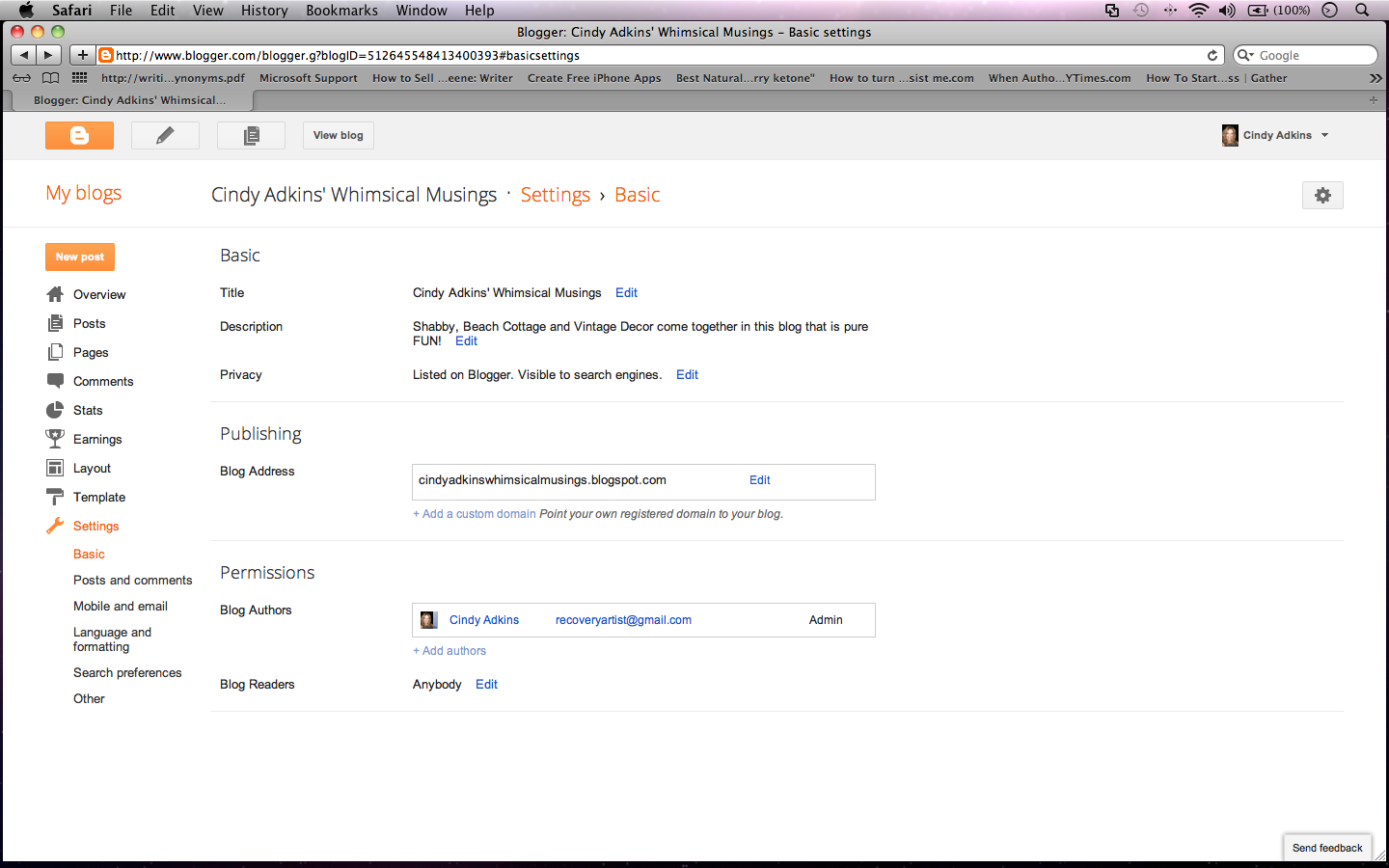
You will see your TEMPLATE page.  On the left side bar, push SETTINGS.


A page will appear like the one above.  When you get to that page, simply click POSTS AND COMMENTS on the left sidebar.


Once you are on that page, you will see your options.  Where it says COMMENT MODERATION,
click NEVER.

Save and you're done!!!

Thank you for viewing my tutorial. I hope it has been helpful. For more info. on blogging (not the technical part), I have written 2 books, which are each available on Amazon. They are:


Thanks for visiting,

Cindy Adkins

If this tutorial has been helpful, please click the +1 button down below--thanks so much!

What does the Google Plus 1 Button Mean?


Here is a screen shot of my Whimsical Musings blog (my main blog.) To see a close-up, just click on the image of the page. If you notice below the post, there is a +1 button in turquoise-blue. People have been asking me what it means.

If you read a post and you like it and/or it was helpful to you, if you click the +1 button, it will let people know that you appreciate the article and time it took for them to write it. It is very much like a "Like" button on Facebook.

To me, it is just courteousness. It's like saying "Thank you" or "I'm happy to see you." It only takes a second to push it and if it helps my friends in blog land get more recognition, I am happy for that!

I hope this was helpful. If it was, could you please push the +1 button for me? I would like other people to understand what it is all about and hopefully news of this will travel quickly from one blog to another--that's my goal!

I am the author of 3 e-books on Amazon:

Blogging: It's a "Woman" Thing

Blog from the Heart: A Woman's Guide to Blogging

For Brides Only: Creating a Wedding Blog

Thanks so much for visiting!!!

Cindy

Friday, September 30, 2011

Center a Blog Header in Blogger


Hi Everyone~

Often, people need to move their blog headers to center them.  Those that are off-center show that a blogger is "lost" on the virtual highway...I know because I was lost once!  So, here's how you can center a blog header.  It's not hard.  I would suggest that you write down the steps.  That will make it easier.

First, I will go to my blog. I will go to the top
where it says DESIGN and click it.  (That's in the picture up above.)


I will arrive at the TEMPLATE page.  There I will look for the orange button that says DESIGN and click it! (The page will look like the one above.)


Next, a screen like the one above will appear.  It is the TEMPLATE DESIGNER page. I will push ADVANCED on the left sidebar..


Once I go to the new page as seen below, I will scroll down to where it says CSS FEED and push that.

Keep in mind that when you land on this last page (where all the magic happens!) you will not see ADD CSS .  That is why you need to move that blue bar down on the left side of your screen.  You will then see ADD CSS.


Almost done!


Click ADD CSS, You will see a screen. You will see a code. You will increase the number if
you want to move the header to the right. You will decrease the number if you want to move it to the left.


In this picture, you can see that it says 35 px. Just insert a different number to move it.

If I want to move it to the right, I put in 45.  If it's not enough, I just keep going up in increments of 10.
It's the same for if I want to move it to the left.  I start at 35...So, if it's not correct, I put in 25...I keep going down until I get the placement I want.

The larger the number, it moves right.  The lower the number, it moves left.

Get it where you want it and then at the top right, click APPLY TO BLOG.

That's it!!!

Special Note: Sometimes people go into their blog templates and there is no code there on that screen at all. If you want, you can copy and paste this code from my blog and then just change the numbers in it to move your header.


.header-outer {
margin-left:35px;
}


I am the author of 3 e-books on Amazon:


They were created to give
you the inspiration to make your blog rock!

Thanks for visiting--and I hope that this tutorial helped!

XO

Cindy

How to Check Your Stats on Blogger


Checking your stats is really important!  Start at your main page.  Scroll up to the top and click DESIGN.  

Next, you will see your Template Page.  On the left sidebar, you will see a list.  On it, look for
STATS.  Push it!


It will take you to a page that will look like the one above.  Every time I go to it, I can see:

How many visitors I have had
Where they came from
Which posts they read
Which words they used to search for my blog

When you do this on your own blog, make sure that
your own visits are not counted amongst the visitors.
There is a button to push where you can eliminate
yourself from being counted.

If you would like to feel inspired, I have written 3 books.
These are ebooks on Amazon and they are:


I hope that this tutorial was helpful! If it was, please click the +1 button below--thanks!

XO
Cindy

How to Make a Favicon and Insert it Into Blogger


First--what is a FAVICON? Look up at the top of this blog where the address bar is...See the fleur de lis? That is a favicon. It is a teeny tiny picture to put into your blog address to personalize it.


If you would like to create a favicon for your blog,
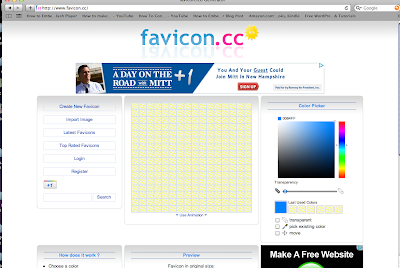
first go HERE. At this website, you will upload a
picture from your computer and it will automatically
create a small favicon for you. When you get the
picture, save it to your desktop.

Then, go to your blog. For purposes of this
demonstation, I am showing you my Whimsical Musings
blog.

As you look at your own blog, go to the top of the page
where it says "Design" and click it.


Here you will come to your Template. At the top
left, you will see it says "favicon."


At this point, click "Edit."


Now you will be asked to choose a file from your desktop.
You will choose the image you just made at the other
website. So, choose the file and click "save."

Now, exit your blog completely and once you are
at your browser, come back and visit your
blog again. Your favicon should appear up in
the search bar.

Note: Sometimes they are tricky and you may have
to insert them more than once--I know because I had
that happen, although I have no idea why! But, if it does
give you a problem, just try to upload it again.

I hope that this has been helpful. I am the author
of 3 Amazon e-books.

These are not technical in nature, but rather
are inspiration for creating your blogs.


Thanks so much for visiting! If this was helpful,
please let me know. I'd always appreciate it if
you could post this to Facebook--the button
is right underneath this post and says "F."

All the best,
Cindy

How to Add a Blog Button to Blogger


Many people want to know how to add a blog button to their blogs. I will show you how to insert on your blog.

But, first make sure that you save the button to your desktop so that you can work with it.

So, how is that done? 

Here is a screen shot of my personal blog. On your own Blogger blog, go to the top and push "Design" at the upper right. You will then come to your template page. 


Here is a picture of the Template Page.


On the left sidebar, you will see LAYOUT.  Click it.  It will take you to your layout page.  Click "Add a Gadget."


Once you do, a drop-down menu will appear.  Scroll down it until you see "Picture."


You will add your button as a "picture."  (If you notice, there is a picture of a tree in green.) Make sure that you know how the picture is labeled on your desktop so that you can find it.

When you push the word PICTURE, another drop-down menu will appear.  It is not pictured here.  It says CONFIGURE IMAGE at the top of it.  This is where you will choose a file from your desktop.  Look for the image that is your blog button picture.

There is also a space to give it a name.  If it is your own blog button that you are inserting, just call it My Blog Button.

Later, if you ever want to move your blog buttons around, this will make it handy for you.

When you add your OWN blog button, you do not need to insert an address...
Click "Save" and you're done!  All you need is the button and to label it with a name, "My Blog Button"--easy, peasy!

(When you get used to doing this, you can insert a blog button in a matter of seconds!)

If you are inserting someone else's button, you need to type their address in where it asks for their link.

If you are inserting my blog button, you will type in: cindyadkinswhimsicalmusings.blogspot.com
Once the picture is inserted and the link is typed in, click "Save."

If you don't, it will disappear!

Now go back to your blog to make sure that you see it on your sidebar.

If you have inserted a friend's button, make sure that you reach their address if you click on it.

If it did not work, just go back and make sure that you entered their address properly. If you
inserted the blog button on your sidebar, but it does not navigate to your friend's blog,
it is of NO use!

Important: If you want to insert a blinking button, simply go to your template exactly the same way. When the dropdown menu appears, do not look to insert a "picture." Instead, take the html code from the button that you want (you will see it underneath the blinking button on the person's blog) and then insert the code under "HTML." That's it!  In other words, you still go to "Add a Gadget," but you don't enter it as a picture.  The drop-down menu has an option of inserting an html code for it instead.

Was this helpful for you? Please let me know!!!

If you need more info. that is FUN, I hope you will read my new ebooks on Amazon. Blogging: It's a Woman Thing and Blog from the Heart: A Woman's Guide to Blogging. Yes, they are filled with inspiration for you to make your blogging rock!

If you need a blog button designed for your blog, as a graphic artist, I do design them and would be happy to. A blog button is necessary if you want people to post them with back-links for your blog. We ALL need more back-links! lol Just email me for the price at: Cindylou_20@hotmail.com They're not expensive!

Thanks for visiting!


Thursday, September 29, 2011

How to Blog--Blog from the Heart: A Woman's Guide to Blogging


Have you read my new ebook on Amazon? It's called

Most people tell me that the hardest thing about writing
a blog is coming up with fresh content. No worries! This
book will give you all kinds of tips and guidelines as
to what to write about to make your blog a "fun read"
for everyone who visits.

You can download the book in minutes and be on your way
to creating a FABULOUS blog that you truly care about
and that others will be eager to visit!!!

To see some examples, visit my main blog,
so much going on there--contests, giveaways, and
this week--A FREE Seminar About Blogging.

Why not grab a cup of tea and come take a look.
It will be fun and informative and give you a
chance to meet and visit with LOTS of fellow
bloggers!!!

XO
Cindy

Friday, September 23, 2011

Blogging: It's a "Woman" Thing


So many women want help with starting or improving their blogs. I have a new ebook that has just been published on Amazon called Blogging: It's a "Woman" Thing and I am so excited. Have you ever wondered how to get new visitors to your blog or how to keep up with writing new content? This book can give you valuable tips. But, more than that, it's my personal story.

I love being helpful. During the course of my blogging experience (which has been awesome) I have been asked so many questions and this book, as well as Blog from the Heart: A Woman's Guide to Blogging help to answer so many of those questions--and more.

XO
Cindy

Monday, September 5, 2011

Creative, Indeed!

Hi Everyone~

I would like to introduce you to Sherry
of Createology!! Sherry designs, sews,
runs her own Etsy shop, and creates
all kinds of paper crafts too!!


Hmmm....I wonder what she does in her spare time?
My guess is that every moment with this amazing
woman is all about getting her creative groove
on!


Of course, this ATC complete with Dorothy's red shoes
stole my heart~


And this Boho pouch was created by hand--a true
sign of Sherry's versatility!

Have a wonderfully creative week, everyone!!!

XO
Cindy